Using Light Switch Icons to Organize Your Home
Labeling your light switches isn’t just about aesthetics—it’s about making your home easier to use. Whether you’re dealing with kids flipping every switch just to find the right one, or guests unsure what controls the porch light, light switch icons for home create instant clarity in every room.
Here’s how to use light switch icons effectively—room by room—to organize your home and simplify life for everyone who lives there (or visits).

🏠 Why Use Light Switch Icons for Home Organization?
Light switch icons make your lighting setup understandable at a glance. No more guessing. No more flipping switches at random. And no more related frustration.
They’re especially helpful for:
- Families with kids
- Aging parents or relatives
- Frequent guests or vacation rentals
- Households with multi-switch panels
📍 Room-by-Room Guide to Light Switch Icons
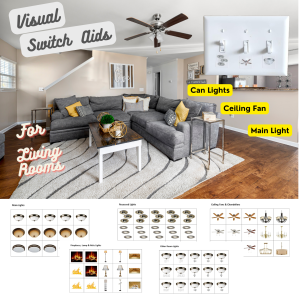
1. Living Room / Family Room – (Light Switch Icons for Home – Priority)
Common Switches:
- Ceiling fan
- Overhead lighting
- Accent or lamp lighting
Recommended Icons:
- Fan icon
- Lightbulb or lamp
- Recessed light icon
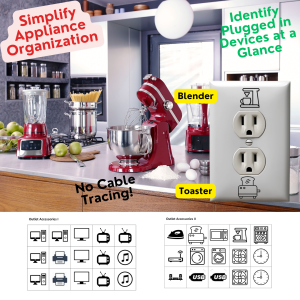
2. Kitchen
Common Switches:
- Pendant lights
- Under-cabinet lighting
- Over-sink light
Recommended Icons:
- Pendant or hanging light icon
- Cabinet light
- Sink light
2. Entryway or Foyer
Common Switches:
- Porch light
- Garage light
- Hallway or staircase light
Recommended Icons:
- Outdoor light icon
- Garage door light
- Lightbulb for general illumination
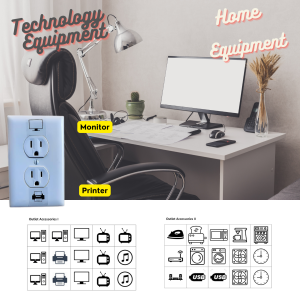
4. Home Office– (Light Switch Icons for Home – Priority)
Common Switches:
- Computers and Monitors
- Printers
- Television
- USB
Recommended Icons:
- Computer
- Monitors (Left and Right)
- Power Supply Unique Icons
5. Kids’ Bedrooms
Common Switches:
- Room light
- Night light
- Closet or lamp switch
Recommended Icons:
- Lightbulb
- Star or moon icon (if available)
- Lamp icon
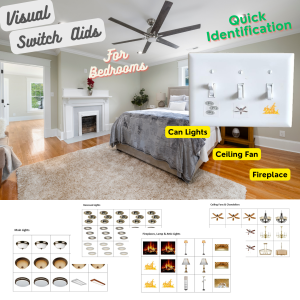
6. Master Bedroom
Common Switches:
- Ceiling fan
- Main light
- Sconce or reading light
Recommended Icons:
- Fan icon
- Lightbulb
- Wall sconce or lamp
7. Garage or Utility Room– (Light Switch Icons for Home – Priority)
Common Switches:
- Overhead lighting
- Workbench lights
- Outdoor floodlights
Recommended Icons:
- Utility light
- Motion floodlight
- Garage light icon
8. Outdoor Spaces
Common Switches:
- Backyard light
- Patio or deck lights
- Security or motion lights
Recommended Icons:
- Floodlight icon
- Deck or patio light
- Security camera light
🧩 How Correct Switch – At Home Makes It Easy
The Correct Switch – At Home kit includes:
- Over 400 pre-printed icons, text labels, and bilingual options
- Transparent labels that blend into any décor
- Multiple icon types for ceiling fans, lights, outdoor fixtures, and more
- Color-coded icons to distinguish between light types or locations
⚡ Tips for Labeling Each Room
- Use icon-only labels for children, guests, or shared homes
- Combine icon + text labels in multi-use rooms
- Apply labels just above or beside the switch for visibility
- Use red or bold icons for outdoor or high-energy zones
📎 Related Articles in This Series:
- What Are Light Switch Icons? (And Why Every Home Should Use Them)
- Switch Icons vs. Text Labels – Which One Works Best in a Family Home?
- Why Every Home Needs Outlet Labels
🏁 Final Thoughts
Organizing your switches with icons is one of the easiest, most impactful upgrades you can make at home. It saves time, prevents confusion, encourages energy-saving, and makes your home friendlier for everyone who lives there—or visits.
With Correct Switch – At Home, you don’t need to guess. You just glance, flip, and go.